Auto Search for Email Extractor: Bulk Extract Emails from Google, Bing & More
Save hours with Auto Search: automatically paginate through Google, Bing, Yahoo & more to bulk extract emails. No manual copying—just install, search, and grow your list.
Meet Auto Search: Extract Emails at Scale, Without the Clicking
Manual lead generation is slow. Our users told us they were spending 2-3 hours just clicking "Next Page" and copying emails one by one. So we built Auto Search—and early testers cut that time down to under 15 minutes.
It's designed to scale your outreach without the busywork.
What Is Auto Search?
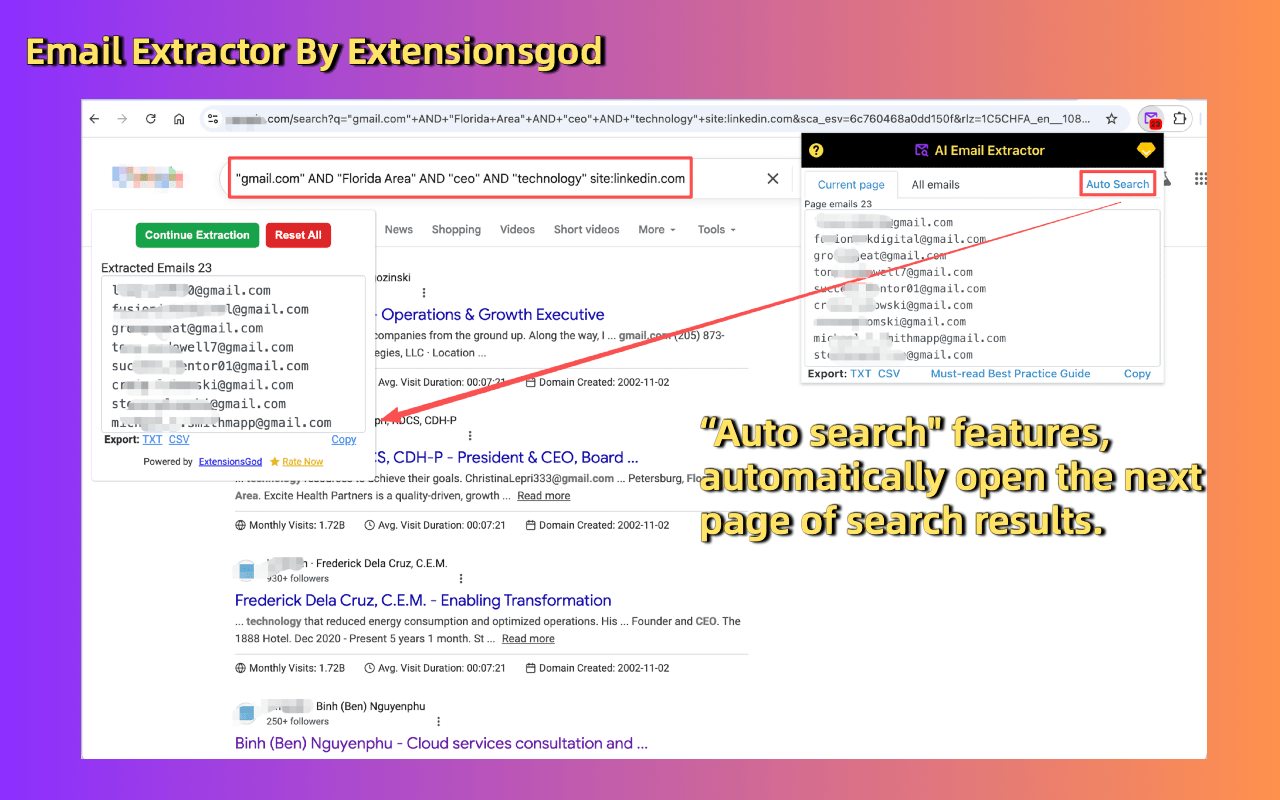
Auto Search lets Email Extractor automatically browse through search results and extract visible email addresses from every page. You set the query; the tool handles the rest—pagination, loading, and compilation.
💡 Think of it as a research assistant that never gets tired of clicking "Next."
Multi-Engine, Global Reach
Different markets use different search engines. Auto Search supports all major platforms so you can reach audiences wherever they are:
- Google (global default)
- Bing (great for local business searches)
- DuckDuckGo (privacy-focused queries)
- Yahoo / Yandex (regional coverage)
Why Users Love Auto Search
- Save Time: No more manual pagination. One click, and the tool browses hundreds of pages for you.
- Bulk Extraction: Gather 200+ emails in a single session—perfect for campaign launches.
How It Works (With Screenshot)
- Install Email Extractor
- Search on Google/Bing/etc.
- Click Auto Search
- Watch the tool page through results and compile your list
Used by 1,200+ marketers and founders. Questions? Reply to this post or DM us help@extensionsgod.com.