How to Find Customer Emails Using Google Search & Email Extractor: A Practical Guide
Learn how to grow your customer base efficiently. Combine smart Google search operators with Email Extractor to find and organize professional email addresses quickly.
Growing your customer base doesn't have to be complicated. We know the struggle: spending hours on expensive databases only to find outdated contacts. There's a better way. In this guide, you'll learn how to combine smart Google search techniques with Email Extractor to bypass the noise. No expensive subscriptions needed—just a smarter workflow to reach the right people directly.
Here is a straightforward, four-step approach to building your lead list.
Step 1: Understand Your Ideal Customer
Before you start searching, get clear on who you're trying to reach. Define their industry, job title, interests, and online behavior. A well-defined customer profile helps you search more effectively and avoids wasting time on irrelevant contacts.
Step 2: Identify Where Your Audience Gathers
Your potential customers are already active online. They might be on LinkedIn, industry forums, GitHub, Crunchbase, or niche blogs. Pinpoint these platforms so you know exactly where to look for their contact information.
Step 3: Use Targeted Google Search Queries
Google's search operators help you narrow down results to pages likely containing professional email addresses. Here is how to structure your searches:
- For company-specific contacts: Try
email site:companywebsite.comto find addresses associated with a particular business. - For role-specific emails: Use
"marketing manager" email site:linkedin.comto locate individuals by job title. - Combine role, location, and platform: Try
"job title" "region" email site:linkedin.com/in/.
Ready-to-Use Search Examples: Here are a few practical queries you can use today (just replace the brackets with your target terms):
"@gmail.com" AND "New York" AND "marketing manager" site:linkedin.com/in/"contact" AND "tech startup" site:crunchbase.com"@yahoo.com" AND "software developer" site:github.com"contact information" AND "real estate agent" AND "Miami" site:zillow.com"@edu" AND "professor" AND "biology" site:.edu
Step 4: Extract Emails Efficiently
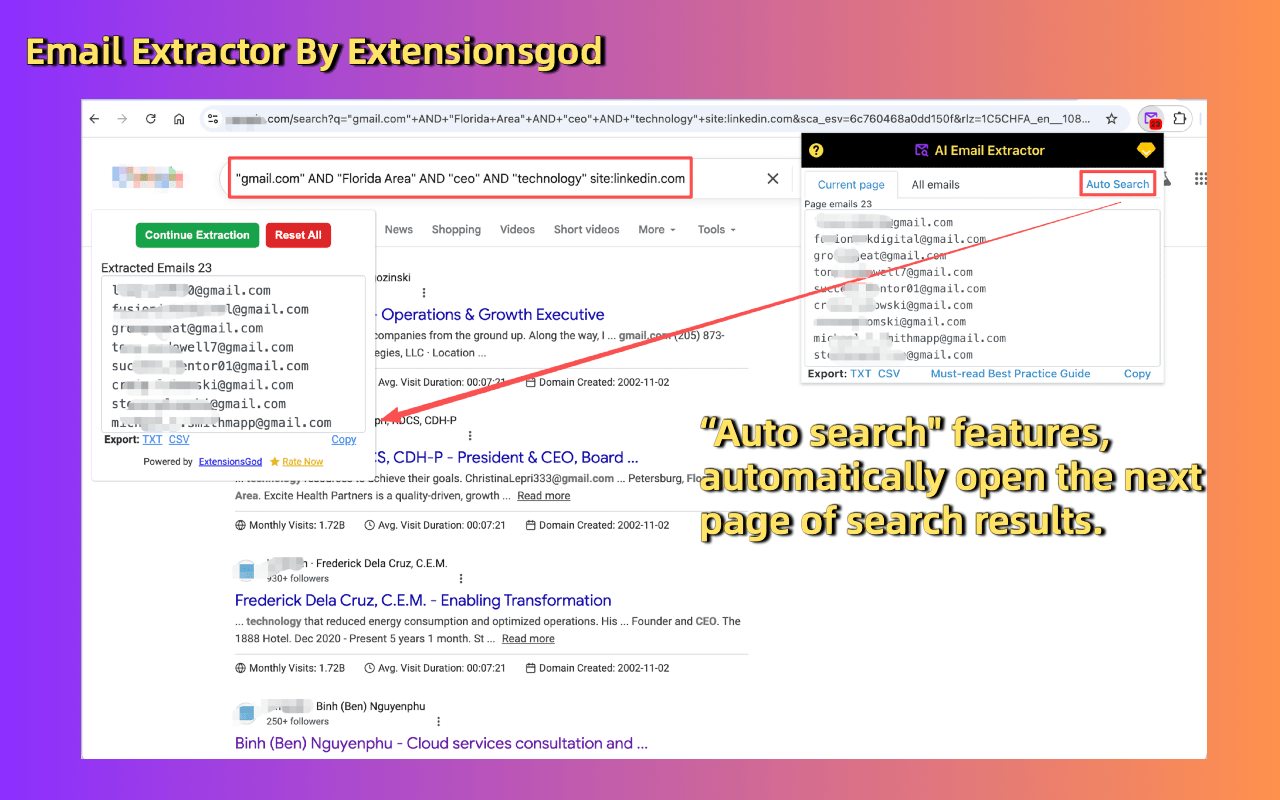
Once you've built a list of relevant web pages or search results, don't copy emails manually. Use an email extraction tool like Email Extractor to automatically gather email addresses from the page. This saves time and helps you organize contacts quickly.
Start Connecting Today
This guide gives you a clear, natural, and actionable path to finding and connecting with customers. Install the extension, try these search queries, and start growing your network efficiently.